The best smart home devices for renters, and what to ask the landlord about
A rented home can be a smart home, as long as everything plugs in, sticks on or clips on, and comes with you when you move. These picks leave no holes and need no electrician.
By Quiet SwitchUpdated November 1, 2026No sponsored placementSpecs from maker documentation and the live listing
Buttons on this page are Amazon affiliate links: if you buy, Quiet Switch may earn a commission at no cost to you. Nobody pays for a position. How this works.
The best smart home devices for renters plug in, stick on or clip on: Matter plugs and bulbs, battery sensors, the SwitchBot Curtain 3 on your existing rail, and the Wyze Cam v4 on its magnetic base. Locks, thermostats and wall switches need the landlord's agreement.
Which platform runs your house?
Pick one and the cards below gray out anything that will not work with it.
Not sure yet? Pick whichever phone most people in the house carry.
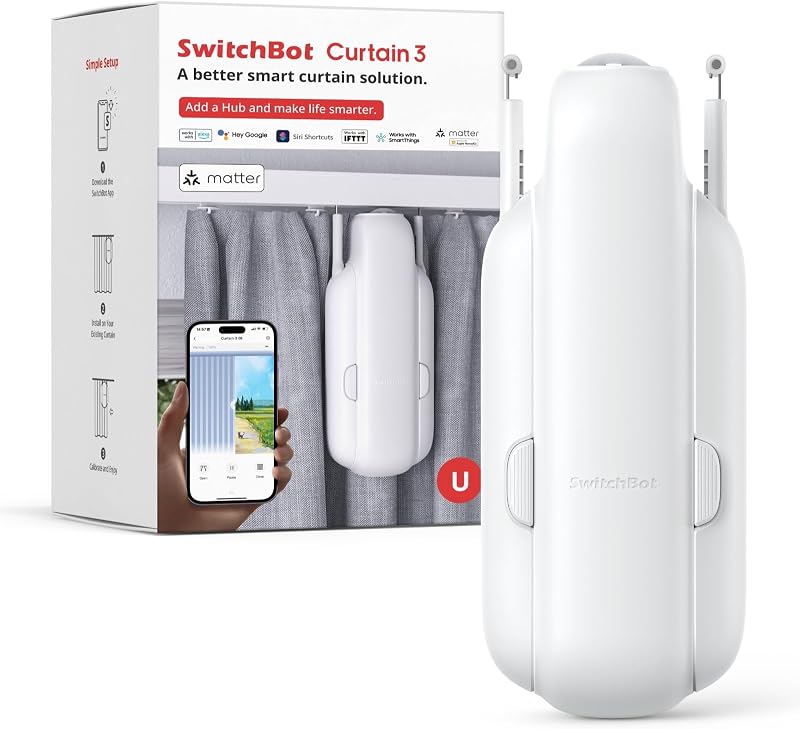
Renters and anyone who does not want to replace perfectly good curtains to automate them.
AlexaYes
GoogleYes
AppleYes
SmartThingsYes
Fit
Clips onto existing rail
Power
Battery; solar panel sold separately
Platforms
Need a SwitchBot Hub (sold separately)
Noise
Quiet mode
It clips onto the curtain you already own, so this is the only automation here that leaves no trace when you move out.
An optional solar panel, sold separately, keeps it charged on a sunny window and removes the recharging chore.
Opening the bedroom curtains on a sunrise schedule is the one automation that most people keep using after the novelty wears off.
Skip this ifHeavy blackout curtains on a stiff rail will defeat it, and on its own it only talks Bluetooth to a phone nearby: Alexa, Google, Apple Home and control away from home all need a SwitchBot hub.
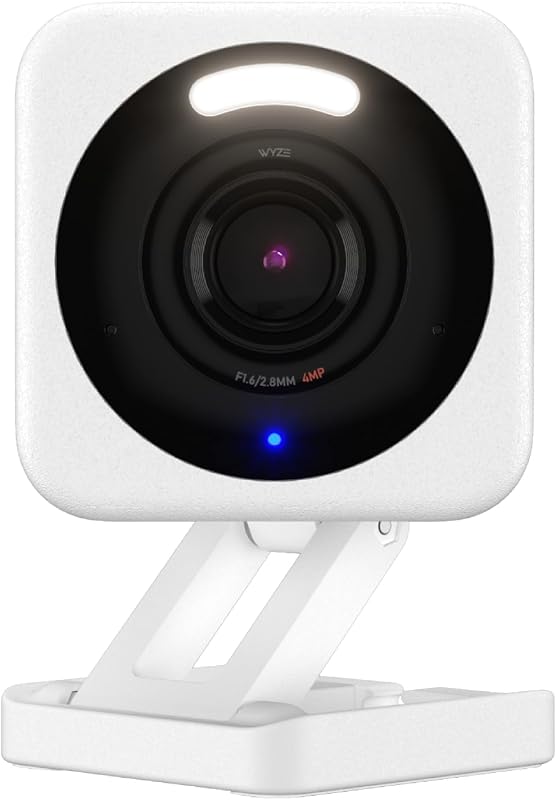
A porch, driveway or garage where a light and a siren that fire on motion are worth more than a sharper picture.
AlexaYes
GoogleYes
AppleNo
SmartThingsNo
Video
2.5K (2560×1440), 120°
Rating
IP65 indoor/outdoor
Storage
microSD up to 512 GB, no fee
Power
Wired; outdoor adapter sold separately
Records to a microSD card of up to 512 GB with no monthly fee; Wyze's Cam Plus cloud plan is optional rather than required.
Motion triggers a built-in spotlight and a siren, and the listing says person, package, pet and vehicle detection runs on the camera itself.
The magnetic base and freestanding stand mean an indoor placement needs no drill, which suits renters.
Skip this ifIt joins 2.4 GHz Wi-Fi only, outdoor use needs a weatherproof power adapter sold separately, and there is no Apple Home support. Power cut? It stops recording, because there is no battery.
Under the washer or sink; a phone alert before the downstairs neighbor calls.
Ask the landlord first
Smart locks replace the deadbolt. Keep the original lock and put it back at move-out.
Thermostats touch the heating system. Keep the old one, and photograph the wiring before removing it.
Wall switches mean working on mains wiring. In many places that is a job for a licensed electrician.
Wired doorbells connect to the doorbell transformer. A battery doorbell is easier to agree to, though it still screws to the door frame.
A leak shutoff valve clamps on without pipe work, but it still sits on the building's plumbing.
Move-out checklist
Remove every device from your apps and accounts, then factory reset it.
Put back original bulbs, locks and thermostats if you swapped them.
Peel adhesive mounts slowly; warm them with a hair dryer if they resist.
Delete the home from Alexa, Google Home or Apple Home so the next tenant's devices cannot find yours.
FAQ
Questions people ask
Can renters install a video doorbell?
A battery doorbell needs no wiring but still screws to the frame, so ask first. Some landlords agree readily because it improves security.
Do smart home devices work in apartments with shared Wi-Fi?
Often not well. Many devices need a 2.4 GHz network you control, and shared building Wi-Fi may block device-to-device traffic. Your own router is the reliable fix.
What smart home devices increase security for renters?
A camera with local storage, contact sensors on doors and windows, and smart plugs that make lamps look lived-in while you are away.
Quiet SwitchOne person, no sponsors, no devices owned. Specs come from maker documentation and the live listing; nothing here is written as though it had been tested in this house. How this site works →