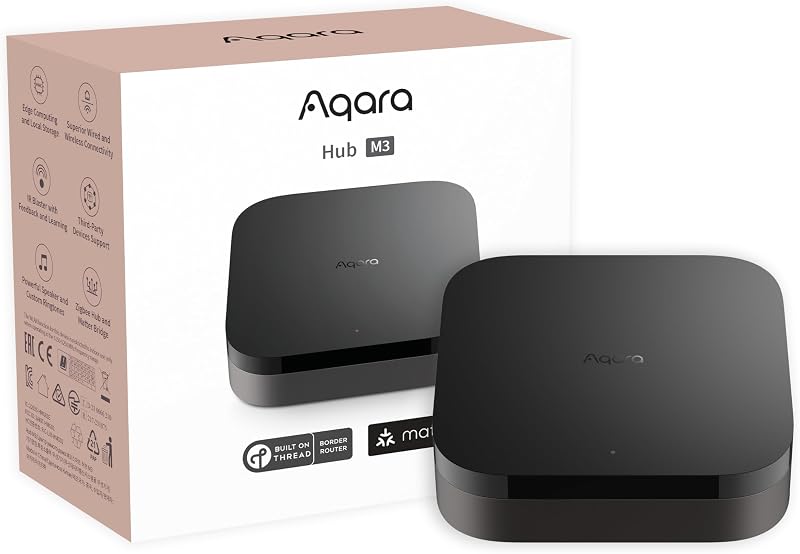
Aqara Hub M3: one box for Matter, Thread, Zigbee and IR
The M3 is Aqara's answer to the question every mixed household eventually asks: which hub makes everything else talk? On paper it covers more ground than any hub in its class.
By Quiet SwitchUpdated November 1, 2026No sponsored placementSpecs from maker documentation and the live listing
Buttons on this page are Amazon affiliate links: if you buy, Quiet Switch may earn a commission at no cost to you. Nobody pays for a position. How this works.
The Aqara Hub M3 is worth buying for a household with mixed phones and Zigbee or Thread devices, because it is a Matter controller, Thread border router, Zigbee hub and IR blaster in one box that runs automations locally. Skip it if you are all-Apple with an Apple TV 4K and no Zigbee gear.
How this review was madeQuiet Switch does not own this device. This is a research review built from the maker's specifications and the product's Amazon listing, checked on October 29, 2026. Nothing here is written as though it had been tested in this house.
Best Overall
Aqara Hub M3
Matter
A mixed household where someone has an iPhone, someone has a Pixel, and there are already Zigbee sensors on the wall.
AlexaYes
GoogleYes
AppleYes
SmartThingsYes
Protocols
Matter, Thread, Zigbee, IR
Hub
Thread border router
Local
On-device automation
Power
USB-C / PoE option
Thread border router, Zigbee coordinator and Matter controller in one box, so one purchase ends the protocol argument.
Automations run on the device rather than in a cloud account, which means the lights still work when the internet does not.
Pairs into Apple Home, Google Home, Alexa and SmartThings from the same QR code — it does not make you pick a side.
Skip this ifyour home is entirely Apple and you already own an Apple TV 4K, you have a Thread border router already. Skip this.
A hub with four radios' worth of jobs. It coordinates Aqara Zigbee devices, acts as a Thread border router, works as a Matter controller and bridge, and carries a 360-degree infrared blaster. The Matter bridge is the important part: Aqara devices paired to the M3 can be shared to Apple Home, Google Home, Alexa, SmartThings and Home Assistant.
What stands out on the listing
Local automations. Aqara describes the M3 as an edge hub that, once added, moves automations from other Aqara hubs to local operation. Some cloud notifications still need the internet.
IR with feedback. The blaster detects when someone uses the original remote, so the app's status stays accurate. Paired with an Aqara temperature and humidity sensor, it can bring an IR air conditioner into Matter as a thermostat; the listing notes this works for one AC unit.
Wired options. Dual-band Wi-Fi with WPA3, a PoE port, and a USB-C port that accepts a power bank or mini UPS for outages.
Privacy. No microphone or camera, and 8 GB of encrypted local storage for device lists and automation settings.
What it needs, and who should skip it
It needs nothing extra to work, but its value depends on owning Zigbee or Thread devices. A home of Wi-Fi plugs and an Echo gains little.
Skip it if the household is entirely Apple and already owns an Apple TV 4K or HomePod mini: that is a Thread border router and home hub already, and Eve-style Thread devices will pair to it directly. Consider the smaller Aqara M100 if you only have a handful of Aqara devices, or the SmartThings Station if the house runs on SmartThings.
FAQ
Questions people ask
Does the Aqara M3 support third-party Zigbee devices?
Aqara's listing describes support for Aqara Zigbee and Thread devices and integrating third-party devices into the Aqara Home app. Check Aqara's compatibility list for a specific non-Aqara Zigbee device.
Does the M3 work with Home Assistant?
Yes, through Matter. Aqara's listing names Home Assistant among the Matter ecosystems its bridge syncs with.
Can the M3 run on a battery backup?
Its USB-C port accepts a power bank or mini UPS, per the listing, which keeps local automations running through a short power cut if your network gear is also backed up.
Quiet SwitchOne person, no sponsors, no devices owned. Specs come from maker documentation and the live listing; nothing here is written as though it had been tested in this house. How this site works →